
Embedding
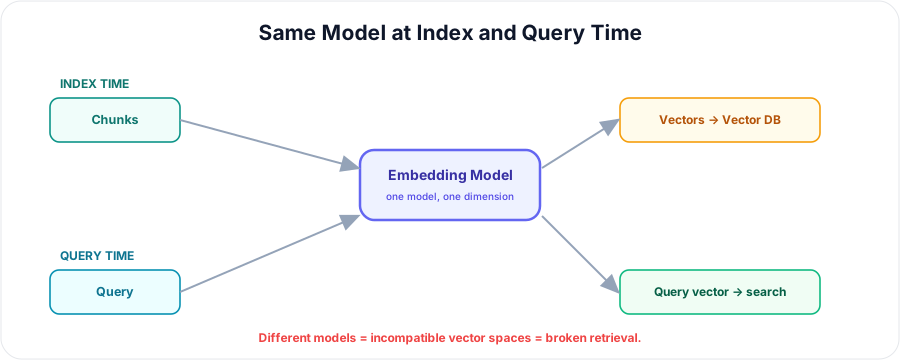
With documents chunked, the next step is embedding: turning each chunk into a vector so it can be stored and searched. You already know what embeddings are — here the focus is the pipeline details that make or break RAG. Above all, one rule dominates: the same embedding model must handle your chunks and your queries, or retrieval simply won't work.
💡 In one line: The embedding step converts each chunk into a vector — using the exact same model you'll use for queries.
What This Step Does
It runs each chunk through an embedding model to produce a vector that captures its meaning. Those vectors are what the vector database stores and searches. (For the fundamentals, see the Embeddings and Embedding Models topics.)
The Golden Rule: Same Model, Index and Query
Chunks are embedded at index time; queries are embedded at query time. Both must use the same model and dimension. If they don't, the vectors live in incompatible spaces and similarity search returns garbage — the single most common RAG bug.
Choosing an Embedding Model for RAG
- Quality — benchmark scores (e.g. MTEB).
- Dimension — affects storage and search speed.
- Max input length — each chunk must fit the model's token limit.
- Multilingual / domain fit.
- Cost — hosted API (OpenAI) vs. open / self-hosted (Sentence Transformers, BGE, E5).
(See the Embedding Models topic for specific options.)
Batching
Embed chunks in batches rather than one at a time — it's faster and cheaper, especially with hosted APIs that reward larger requests.
Normalisation & Prefixes
- Normalise vectors if you'll search with cosine similarity.
- Some models need prefixes/instructions (e.g. E5's
passage:/query:). Apply them consistently at both index and query time — a mismatch quietly degrades results.
Cost & Scale
Embedding N chunks = N model calls. Hosted APIs bill per token; open models cost compute. Plan for re-embedding whenever your data or model changes — switching models means rebuilding the whole index.
Keep Text + Metadata with Each Vector
Store each chunk's text and metadata alongside its vector. The vector is only for finding the chunk; the text and metadata are what you'll return, cite, and filter on.
Best Practices
- Pick one model and use it everywhere.
- Ensure chunks fit the model's max tokens.
- Batch, normalise, and apply prefixes consistently.
- Re-embed everything if you switch models.
Summary
- The embedding step turns each chunk into a vector for storage and search.
- Golden rule: use the same model + dimension at index and query time.
- Choose a model on quality, dimension, max length, language, and cost.
- Batch for speed, normalise for cosine, and apply prefixes consistently.
- Keep text + metadata with each vector — and re-embed when the model changes. EOF echo created

