
Storing
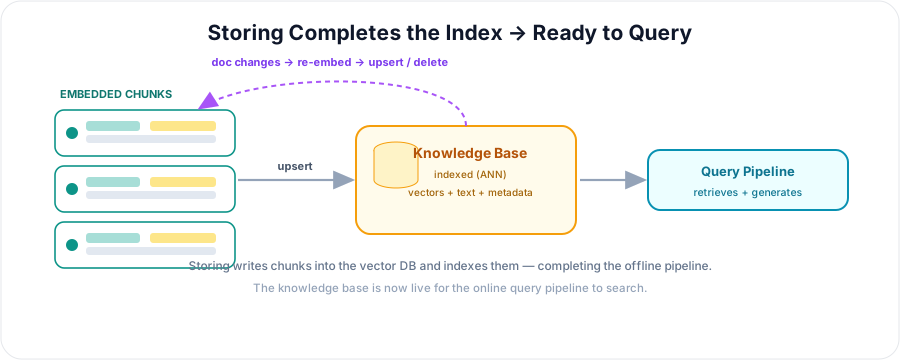
Storing is the final step of the RAG indexing pipeline. Each embedded chunk — its vector, text, and metadata — is written into the vector database, building the searchable knowledge base. Once storing is done, the offline pipeline is complete and the online query pipeline can start retrieving. It's the pivot point where indexing ends and querying begins.
💡 In one line: Storing writes each embedded chunk (vector + text + metadata) into the vector database, completing the searchable knowledge base.
What This Step Does
It persists each embedded chunk as a record in the vector database and indexes it for fast search. This completes the indexing side of RAG — after this, the data is ready to be retrieved.
The Record (Recap)
Each stored record holds:
- an ID,
- the vector,
- the chunk text (kept in metadata), and
- source metadata (page, section, URL, timestamp).
Upsert & IDs
Writes use upsert (insert or update), usually batched. Give each chunk a stable, unique ID that links back to its source document — this is what makes citations, updates, and deduplication possible later.
Indexing
On store, the database builds or updates its ANN index so that retrieval stays fast even across millions of chunks. You typically choose a distance metric (cosine) and index type (HNSW) here.
Collections & Namespaces
Organise stored chunks into collections (per model/dimension) and namespaces (per tenant, source, or project). Remember: one collection = one dimension and one embedding model.
Updates & Re-indexing
Documents change, so storing isn't one-and-done.
Decide between incremental updates (cheaper) and a full rebuild (simpler, cleaner), and always remove stale chunks when source content is deleted.
Keep Text + Metadata
Store the chunk's text and metadata alongside its vector. The vector only finds the chunk; the text is what you feed the LLM, and the metadata is what you cite and filter on.
After Storing: Ready to Retrieve
With chunks stored and indexed, the knowledge base is live. The query pipeline — embed the query, retrieve the nearest chunks, augment, generate — can now run against it.
Best Practices
- Batch upserts; use stable, unique IDs.
- Keep text + metadata on every record.
- Configure the metric and ANN parameters for your needs.
- Plan updates and deletes — don't let stale chunks linger.
- Monitor index size and growth over time.
Summary
- Storing writes embedded chunks (id + vector + text + metadata) into the vector DB.
- It indexes them for fast retrieval, completing the offline pipeline.
- Use upsert + stable IDs, and organise with collections / namespaces.
- Plan for updates and deletions so the knowledge base stays fresh.
- Once stored, the knowledge base is ready for the query pipeline to retrieve. EOF echo created

