
Introduction
Memory management is one of the most critical responsibilities of the Linux kernel because every executing process requires memory for:
Instructions
Variables
Stacks
Heaps
Buffers
Kernel data structures
Modern systems run multiple applications simultaneously, often requiring far more memory than the available physical RAM. Linux solves this challenge using sophisticated memory management techniques that provide:
Process isolation
Efficient memory utilization
Virtual memory abstraction
Dynamic allocation
Performance optimization
Scalability
Linux memory management is extremely important because it directly affects:
System performance
Multitasking capability
Application responsiveness
Server scalability
Cloud infrastructure efficiency
Understanding Linux memory management is essential for:
Operating systems
Linux administration
System programming
Performance optimization
Kernel development
Cloud computing
What is Memory Management in Linux?
Memory management in Linux refers to the mechanisms used by the Linux kernel to allocate, organize, protect, optimize, and reclaim memory resources for processes and kernel operations.
Linux memory management handles:
Virtual memory
Paging
Swapping
Page allocation
Caching
Memory protection
Shared memory
Kernel memory allocation
Core Idea
Linux provides each process with an isolated virtual memory space while efficiently managing physical RAM
Important Insight
Linux uses virtual memory abstraction to provide flexibility, protection, and efficient memory utilization
Why Virtual Memory is Necessary
Suppose:
Physical RAM = 8 GB
Running applications require 20 GB
Without virtual memory:
System would fail
Linux solves this by:
Using disk space as extension of RAM
Managing memory dynamically
What is Virtual Memory?
Virtual memory is a memory management technique that provides each process with the illusion of a large, continuous, private memory space independent of physical RAM layout.
Each process sees:
Its own address space
even though:
Physical memory is shared.
Visualization of Linux Virtual Memory Architecture
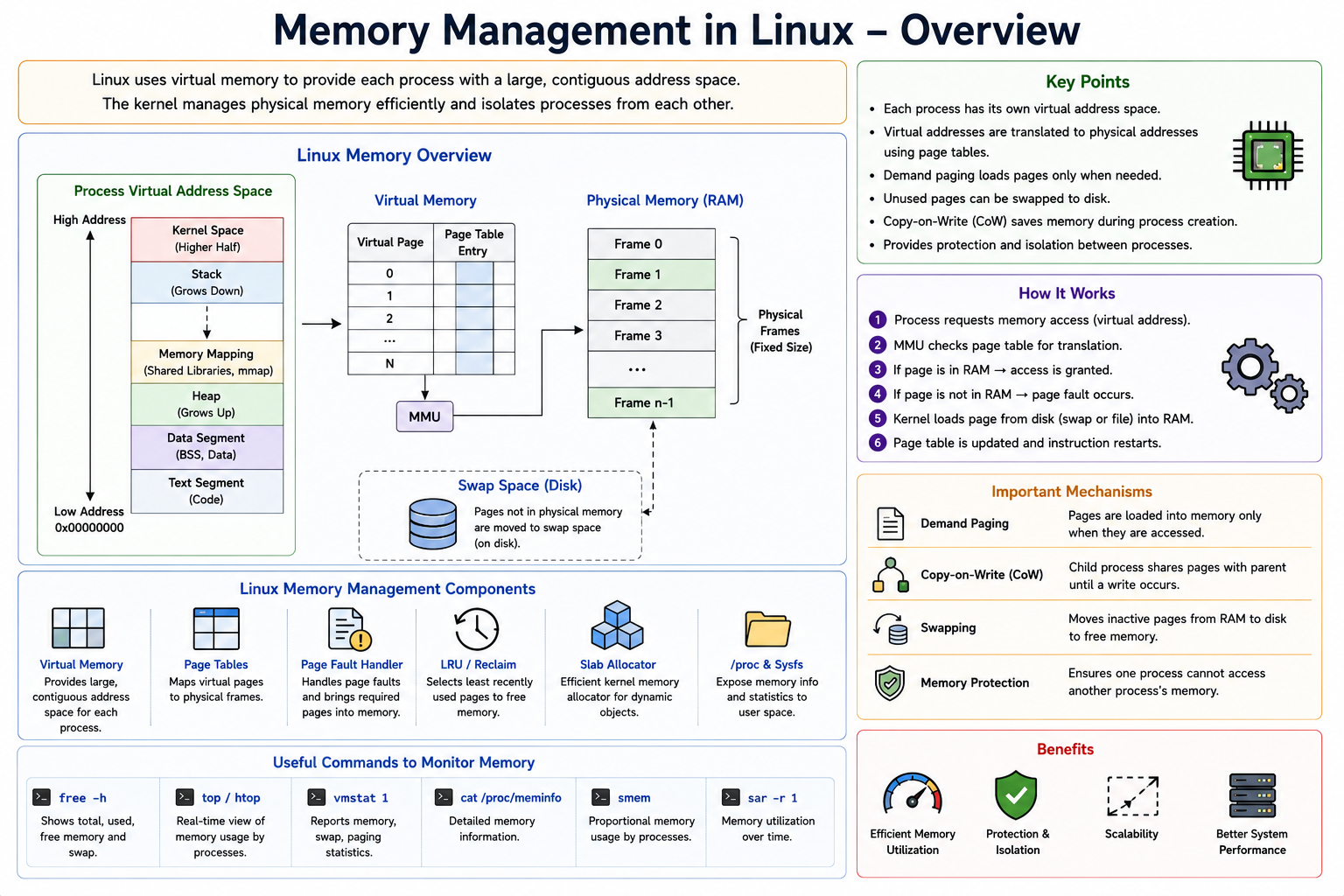
Address Spaces in Linux
Linux separates:
User space
Kernel space
User Space
Process-specific virtual addresses.
Kernel Space
Shared privileged memory region.
64-bit Linux Example
Typical split:
Lower addresses → user space
Higher addresses → kernel space
Advantages of Virtual Memory
1. Process Isolation
Processes cannot directly access each other’s memory.
2. Efficient RAM Usage
Only active pages remain in RAM.
3. Larger Address Space
Processes can use more memory than physically available.
4. Simplified Programming
Applications see contiguous memory abstraction.
Important Insight
Virtual memory separates logical memory view from physical memory organization
Pages and Frames
Linux divides memory into:
Fixed-size blocks called pages
Typical page size:
4 KB
Page
Virtual memory block.
Frame
Physical memory block.
Paging in Linux
Paging maps:
Virtual pages
→ Physical frames
using:
Page tables
Example
Virtual Page 10 → Physical Frame 42
Page Tables
Page tables store memory mappings.
Used by:
MMU (Memory Management Unit)
during address translation.
Address Translation
CPU generates:
Virtual address
MMU converts it into:
Physical address
using page tables.
Translation Lookaside Buffer (TLB)
Address translation expensive.
CPU therefore uses:
TLB cache
to store recent mappings.
Advantages
Faster memory access
Reduced page-table lookups
Important Insight
TLB improves performance by caching virtual-to-physical address translations
Demand Paging
Linux uses:
Demand paging
Pages loaded into RAM:
Only when needed
Process
Step 1
Program references page.
Step 2
Page absent in RAM.
Step 3
Page fault occurs.
Step 4
Kernel loads page from disk.
Important Insight
Demand paging loads memory lazily to reduce unnecessary RAM usage
Page Faults
A page fault occurs when:
Process accesses page not currently in RAM
Types of Page Faults
Minor Page Fault
Page already in memory but mapping absent.
Major Page Fault
Page must be loaded from disk.
Major faults:
Slower
More expensive
Swapping in Linux
When RAM becomes insufficient:
Linux may move inactive pages to disk swap space
This process called:
Swapping
Swap Space
Disk area acting as:
Backup memory
Advantages
Supports larger workloads
Disadvantages
Disk much slower than RAM
Swapping can significantly reduce performance.
Page Replacement in Linux
When RAM full:
Linux chooses pages for eviction
Goals
Minimize page faults
Preserve performance
Linux uses:
LRU-inspired algorithms
Active/inactive page lists
Active and Inactive Lists
Linux tracks:
Frequently used pages
Rarely used pages
Inactive pages:
More likely swapped out
Linux Memory Zones
Linux divides physical memory into:
Zones
Common Zones
DMA Zone
Used for DMA-capable devices.
Normal Zone
Regular kernel memory.
High Memory Zone
Used in some 32-bit systems.
Kernel Memory Management
Kernel itself also requires memory.
Examples:
Process descriptors
File system structures
Buffers
Device drivers
Kernel memory managed separately from user memory.
Buddy Allocator
Linux uses:
Buddy allocation system
for physical page allocation.
Memory split into:
Power-of-two blocks
Advantages:
Efficient allocation
Fast merging
Slab Allocator
Kernel frequently allocates small objects.
Linux uses:
Slab allocator
for efficient object reuse.
Advantages:
Reduced fragmentation
Better cache performance
Important Insight
Slab allocation optimizes repeated allocation of kernel objects
Memory Mapping in Linux
Linux supports:
Memory-mapped files
Files mapped directly into virtual memory.
Advantages:
Faster file access
Simplified I/O
Example
mmap()
maps file into process address space.
Shared Memory
Processes may share memory regions.
Advantages:
Fast IPC
Reduced copying
NUMA in Linux
Large multicore systems may use:
NUMA (Non-Uniform Memory Access)
Memory access speed depends on:
Which CPU accesses which memory bank
Linux optimizes:
Process placement
Memory locality
Overcommit Memory
Linux may allow:
More virtual memory allocation than physical memory
Called:
Memory overcommit
Advantages:
Better utilization
Risks:
Out-of-memory situations
OOM Killer
If system runs critically low on memory:
Linux activates:
OOM Killer
Selects processes to terminate.
Important Insight
The Linux OOM killer protects system stability during severe memory exhaustion
Caching in Linux
Linux aggressively uses free RAM for:
File caching
Disk buffers
Reason:
Unused RAM wasted RAM
Page Cache
Stores recently accessed file data.
Advantages:
Faster file access
Reduced disk I/O
Memory Protection
Linux protects memory using:
Virtual memory isolation
Permissions
User/kernel separation
Memory Permissions
Pages may be:
Read-only
Writable
Executable
Security Benefits
Prevents:
Unauthorized access
Arbitrary code execution
Huge Pages
Large pages reduce:
TLB misses
Translation overhead
Used in:
Databases
High-performance computing
Monitoring Memory in Linux
Important commands:
free
Displays memory usage.
free -h
top / htop
Monitor memory dynamically.
vmstat
Virtual memory statistics.
/proc/meminfo
Detailed memory information.
Real-World Example
Suppose user opens browser with many tabs.
Linux:
Allocates virtual memory
Maps pages dynamically
Uses page cache
Swaps inactive pages if needed
Protects each process memory space
Optimizes memory locality
All automatically.
Advantages of Linux Memory Management
1. Efficient RAM Utilization
Dynamic paging and caching.
2. Strong Isolation
Process protection.
3. Scalability
Supports massive memory systems.
4. Performance Optimization
Caching and TLB usage.
5. Flexibility
Supports diverse workloads.
Challenges of Linux Memory Management
1. Complexity
Very sophisticated subsystem.
2. Swapping Overhead
Disk access slow.
3. Fragmentation
Long-running systems affected.
4. NUMA Optimization Complexity
Large systems harder to optimize.

