

Handwritten digit recognition is a classic computer vision and image classification problem where a machine learning model learns to identify handwritten digits from images.
In this project, we build a Convolutional Neural Network (CNN) using TensorFlow and Keras to recognize handwritten digits from 0 to 9.
The project uses the MNIST dataset, which contains grayscale images of handwritten digits. The model is trained on the MNIST training data and evaluated on the official held-out MNIST test dataset.
The project also includes a dedicated external-image preprocessing pipeline that allows the trained model to process and predict digits from real-world handwritten images.
The overall workflow is:
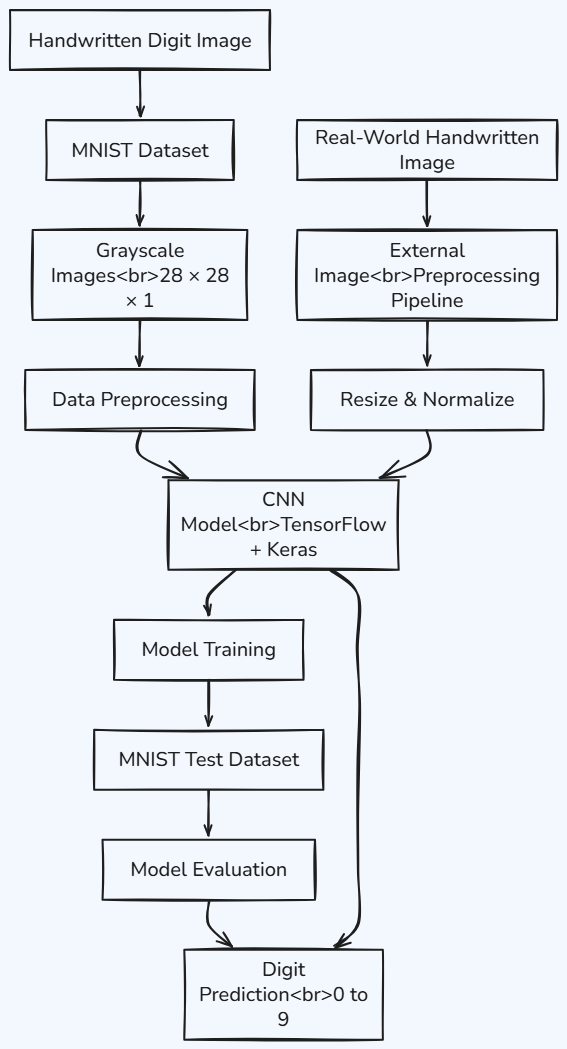
he trained model achieved 99.56% accuracy on the official MNIST test set.
1. Understanding the MNIST Dataset
What is MNIST?
MNIST stands for Modified National Institute of Standards and Technology.
It is one of the most widely used datasets for learning and evaluating image classification models.
The dataset contains handwritten digits from:
0, 1, 2, 3, 4, 5, 6, 7, 8, and 9
Each image represents one handwritten digit.
MNIST Image Properties
| Property | Value |
|---|---|
| Image Type | Grayscale |
| Image Size | 28 × 28 pixels |
| Channels | 1 |
| Classes | 10 |
| Pixel Range | 0–255 |
| Total Images | 70,000 |
Suggested Visual
Insert MNIST sample images showing several handwritten digits from 0 to 9 here.
2. Dataset Split
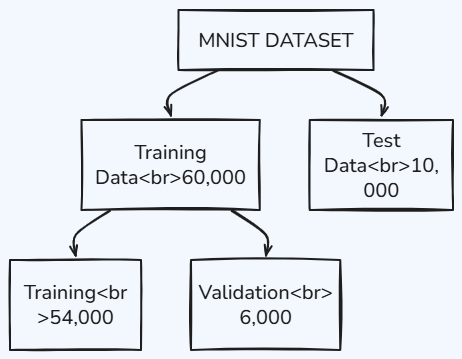
The original 60,000 training images are divided into:
- 54,000 training images
- 6,000 validation images
The official 10,000 test images remain separate for final evaluation.
3. Loading and Preparing the Dataset
The images are converted to float32, and a channel dimension is added so that each image has the shape 28 × 28 × 1.
A stratified split is then used to create the validation set.
4. Data Pipeline
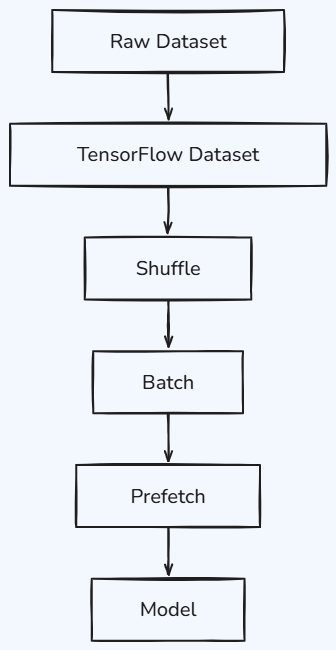
Code
The project uses a batch size of 128.
5. Normalization
The original pixel values are:
0–255
The model converts them into:
0–1
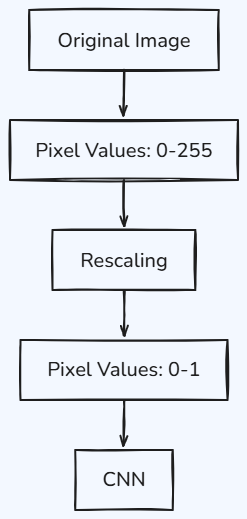
Code
Normalization is included directly inside the model so that the same preprocessing rule is used consistently.
6. Data Augmentation
Real handwritten digits can be rotated, shifted, resized, or written with different contrast.
The project uses:
- Random Rotation
- Random Translation
- Random Zoom
- Random Contrast
Code
Suggested Visual
Insert a visual showing one original digit and its rotated, shifted, zoomed, and contrast-adjusted versions.
7. CNN Architecture
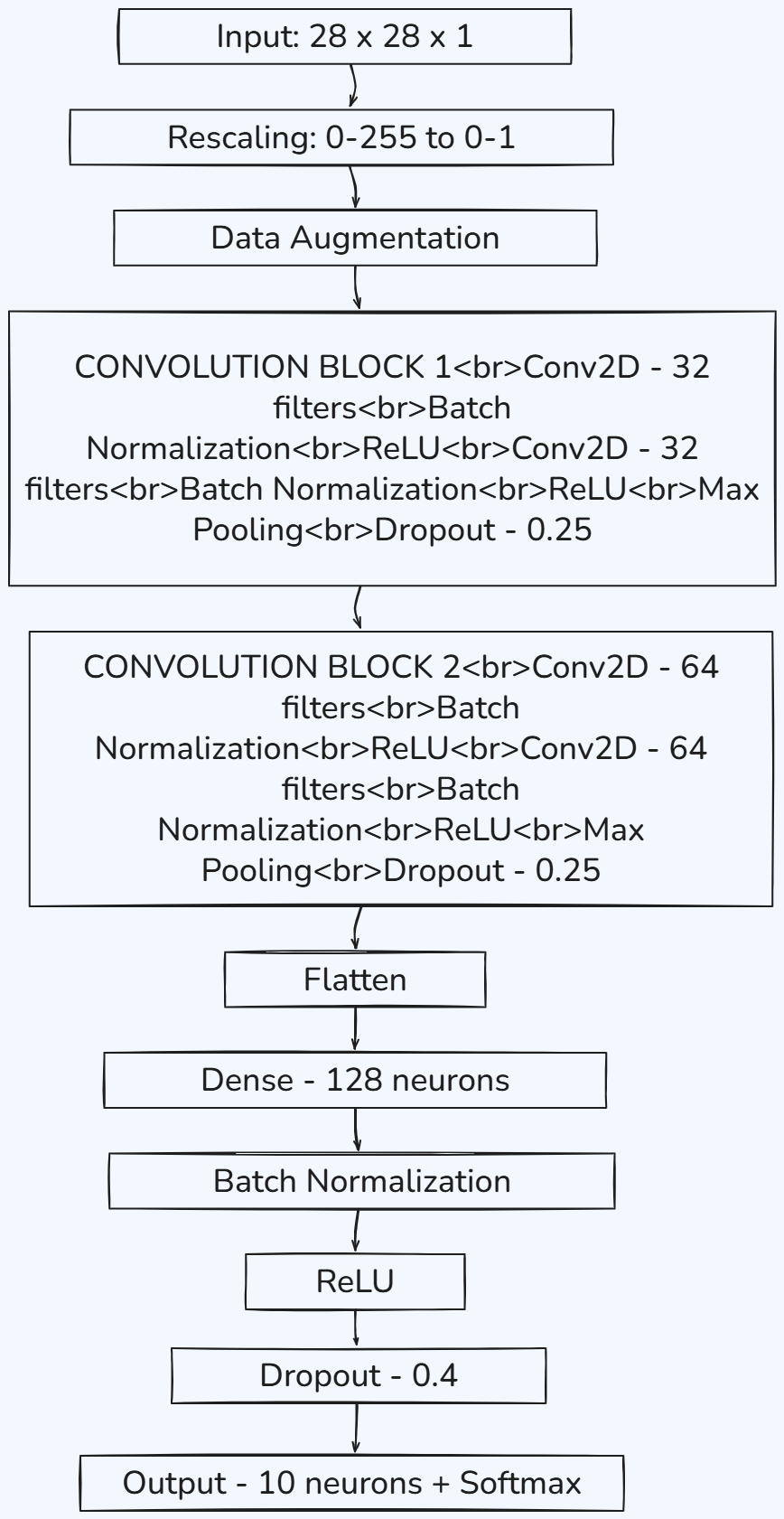
Suggested Visual
Insert a CNN architecture diagram here showing the flow from the 28 × 28 input image through convolution, pooling, flattening, dense layer, and finally the ten digit classes.
8. CNN Model Code
9. Understanding the CNN Components
Conv2D
Conv2D layers learn visual patterns such as edges, curves, lines, and shapes.
Batch Normalization
Batch Normalization helps stabilize training.
ReLU
ReLU introduces non-linearity and allows the network to learn complex patterns.
Max Pooling
Max Pooling reduces the spatial dimensions while retaining important features.
Dropout
Dropout helps reduce overfitting.
Flatten
Flatten converts the feature maps into a one-dimensional representation.
Dense Layer
The Dense layer combines the learned features for classification.
Softmax
The final Softmax layer produces probabilities for the ten possible digits.
10. Compiling the Model
The model uses:
- Adam optimizer
- Learning rate: 0.001
- Categorical Crossentropy
- Label smoothing: 0.1
- Accuracy
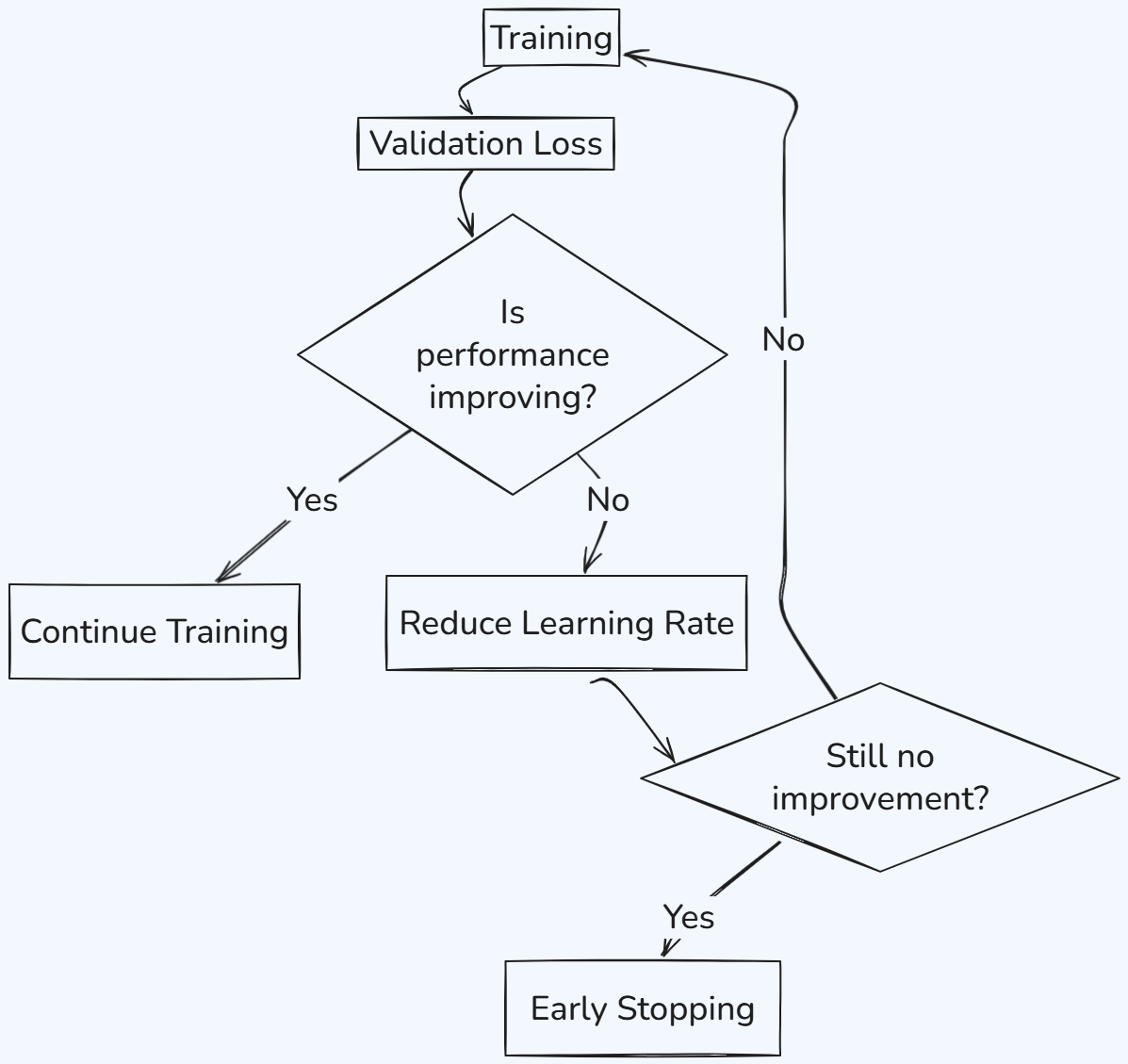
11. Training Callbacks
The project uses EarlyStopping and ReduceLROnPlateau.
Workflow
12. Training the Model
The model is trained for a maximum of 30 epochs.
During training, the model processes batches of images, calculates the loss, updates its weights, and evaluates its performance on the validation dataset.
13. Training Results
The final training epoch produced approximately:
Training Accuracy: 99.06%
Validation Accuracy: 99.27%
Suggested Graph
Insert the Training Accuracy vs Validation Accuracy graph here.
Suggested Graph
Insert the Training Loss vs Validation Loss graph here.
These graphs help us understand how the model learns over time and whether there are signs of overfitting.
14. MNIST Test Evaluation
Output
MNIST TEST ACCURACY: 99.56%MNIST TEST LOSS: 0.5247The model achieves 99.56% accuracy on the official held-out MNIST test set.
15. Why Real-World Images Are Different
A model can perform extremely well on MNIST but still face challenges when given a real photograph.
Real-world images may have:
- Different backgrounds
- Different brightness
- Different contrast
- Different digit sizes
- Different positions
- Different writing styles
- Different image dimensions
Therefore, the project includes an external-image preprocessing pipeline.
16. External Image Preprocessing
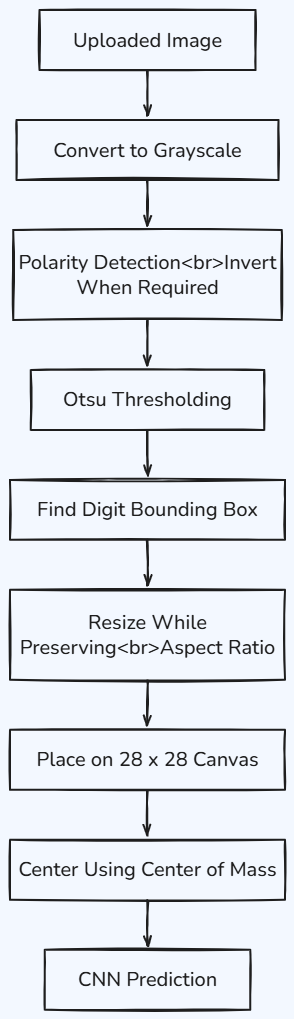
17. Polarity Detection
MNIST generally uses a bright digit on a dark background, while real photographs often have a dark digit on a bright background.
The preprocessing pipeline examines the image border and inverts the image when necessary.
18. Otsu Thresholding
The project uses Otsu's thresholding method to separate the handwritten digit from the background.
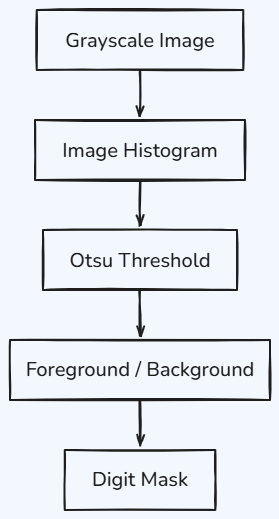
This helps the system identify the area containing the handwritten digit.
19. Finding the Digit
After creating the foreground mask, the system finds the minimum and maximum row and column coordinates.
These coordinates form the bounding box around the digit.
The digit is then cropped from the original image.
20. Resizing the Digit
The detected digit is resized while preserving its aspect ratio.
The goal is to fit it inside approximately a 20 × 20 region, similar to the MNIST representation.
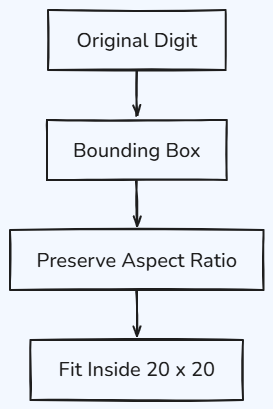
This prevents the digit from becoming unnaturally stretched.
21. Placing the Digit on a 28 × 28 Canvas
The resized digit is placed on a blank 28 × 28 canvas.
22. Centering Using Center of Mass
The digit may still be slightly shifted after being placed on the canvas.
The project calculates the center of mass of the digit and shifts it toward the center.
This helps align external images more closely with the MNIST representation.
23. Original Image vs Preprocessed Image
Suggested Visual
Insert the notebook's side-by-side visualization here: