

Python is a high-level, interpreted, general-purpose programming language that is known for its simple syntax and readability.
It allows developers to write clear and concise code, making it easy to learn, use, and maintain.
Python supports multiple programming paradigms such as procedural, object-oriented, and functional programming, which makes it suitable for a wide range of applications.
Key Features of Python
-
Easy to Learn and Read – Uses English-like syntax and fewer lines of code.
-
Interpreted Language – Code is executed line by line, making debugging easier.
-
Dynamically Typed – No need to declare variable types explicitly.
-
Platform Independent – Same code can run on Windows, Linux, and macOS.
-
Large Standard Library – Provides built-in modules for file handling, math, networking, etc.
-
Open Source – Free to use and community-driven.
Key Reasons for Python’s Popularity
1. Simple and Readable Syntax
-
Code looks close to plain English.
-
Easy for beginners and efficient for professionals.
2. Faster Development
-
Fewer lines of code compared to languages like Java or C++.
-
Helps in rapid application development and prototyping.
3. Large Standard Library & Frameworks
-
Built-in modules reduce the need to write code from scratch.
-
Popular frameworks: Django, Flask (web), NumPy, Pandas (data science).
4. Versatile and Multi-Purpose
Python is used in:
-
Web development
-
Data Science & Machine Learning
-
Artificial Intelligence
-
Automation & Scripting
-
Game development
-
Cybersecurity
5. Cross-Platform Compatibility
-
Runs on Windows, Linux, and macOS without code changes.
6. Strong Community Support
-
Huge global community.
-
Easy access to tutorials, documentation, and open-source projects
He started working on Python in the late 1980s, and the first official version (Python 0.9.0) was released in 1991.
Key Points (for Interview)
-
Developer: Guido van Rossum
-
Started: Late 1980s
-
First Release: 1991
-
Purpose: Simplicity, readability, and efficiency
5. What is an interpreted language?
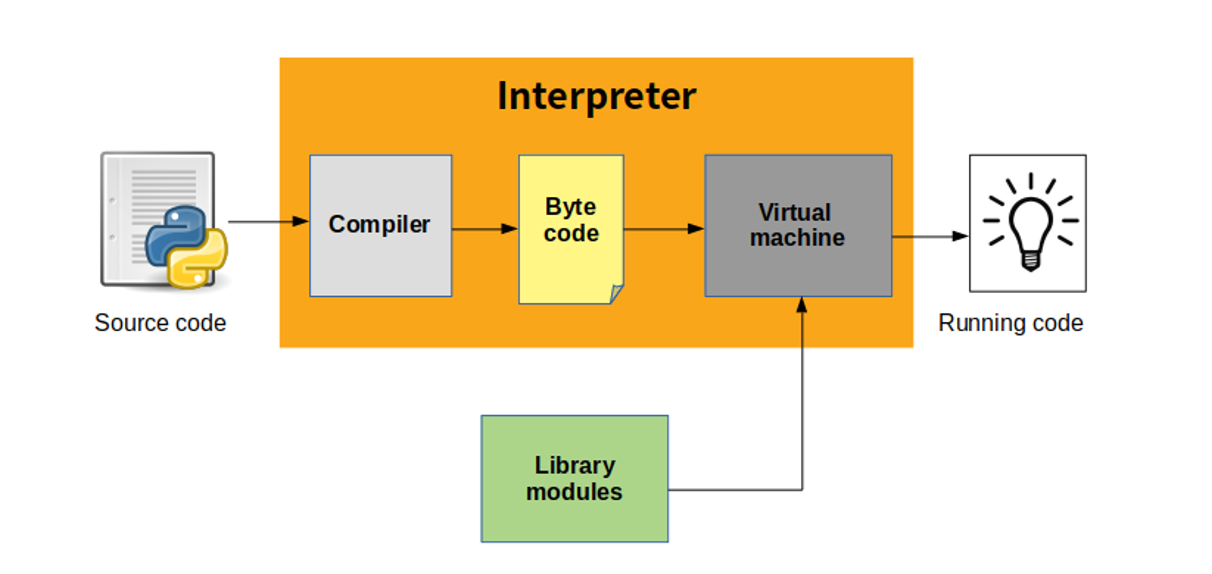
How an Interpreted Language Works
-
The source code is given to an interpreter.
-
The interpreter reads one statement at a time.
-
Each statement is translated and executed immediately.
-
If an error occurs, execution stops at that line, making debugging easier.
A dynamically typed language is a programming language in which variable data types are determined at runtime, not at compile time.
The programmer does not need to explicitly declare the data type of a variable.
In such languages, the type is associated with the value, not the variable.
x = 10 x = "Hello" print(x) #output HelloKey Characteristics
- No explicit type declaration
-
Flexible coding
-
Faster development
-
More runtime errors compared to static typing
-
Easy for beginners
Key Features of Python
1. Simple and Readable Syntax
-
Easy to understand and write.
-
Uses English-like keywords.
-
Improves code maintainability.
2. Interpreted Language
-
Code is executed line by line.
-
Makes debugging and testing easier.
3. Dynamically Typed
-
No need to declare variable data types.
-
Type is decided at runtime.
4. Platform Independent
-
Same Python code can run on Windows, Linux, and macOS.
5. Object-Oriented
-
Supports classes, objects, inheritance, and polymorphism.
-
Helps in writing modular and reusable code.
6. Large Standard Library
-
Built-in modules for file handling, math, networking, etc.
-
Reduces development time.
7. Open Source
-
Free to use and distribute.
-
Backed by a large developer community.
8. Extensible and Embeddable
-
Can integrate with C, C++, and Java.
-
Python code can be embedded into other applications.
8. What are Python’s built-in data types?
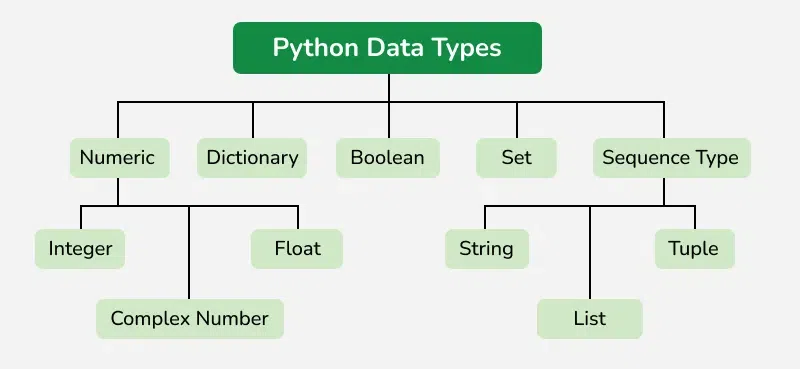
Main Categories of Python Built-in Data Types
1. Numeric Types
Used to store numeric values.
-
int – Integer values
x = 10-
float – Decimal values
Python
f = 10.5-
complex – Complex numbers
Python
x = 10 + 2j2. Sequence Types
Used to store collections of data.
-
str – String (text data)
Python
name = "python"-
list – Ordered, mutable collection
Python
nums = [1,2,3,4]
-
tuple – Ordered, immutable collection
Python
nums = (1,2,3,4)3. Set Types
Used to store unique elements.
-
set – Unordered, mutable
Python
s = {1, 2, 3}- frozenset – Unordered, immutable
4. Mapping Type
Stores data as key-value pairs.
-
dict – Dictionary
5. Boolean Type
Used for logical operations.
-
bool – True or False
Python
is_active = True
6. None Type
Represents absence of a value.
-
NoneType
Python
result = None
Summary Table
| Category | Data Types |
|---|---|
| Numeric | int, float, complex |
| Sequence | str, list, tuple |
| Set | set, frozenset |
| Mapping | dict |
| Boolean | bool |
| None | NoneType |
{ } to define code blocks, Python uses indentation to define the structure and scope of code blocks.Why Indentation is Required in Python
-
It defines code blocks such as loops, functions, classes, and conditionals.
-
It improves code readability and enforces a clean coding style.
-
Incorrect indentation causes an IndentationError, so it is mandatory.
if True: print("Correct indentation") #output Correct indentation10. What is variable scope in Python?
Variable scope in Python refers to the region of the program where a variable is accessible and can be used. It determines where a variable is defined and where it can be referenced in the code.
Python follows the LEGB rule to resolve variable scope.
The LEGB Rule (Scope Order)
-
L – Local Scope
-
Variables defined inside a function.
-
Accessible only within that function.
-
-
E – Enclosing Scope
-
Variables in the local scope of enclosing (nested) functions.
-
-
G – Global Scope
-
Variables defined at the top level of a script or module.
-
-
B – Built-in Scope
-
Predefined names provided by Python (e.g.,
len,print).
-
11. What is global and local scope?
Global Scope
-
A variable declared outside all functions is called a global variable.
Pythondata = [10, "Python", 3.14, True] data[1] = "Java" -
It can be accessed anywhere in the program.
x = 10 # Global variable def display(): print(x) display() Local Scope
-
A variable declared inside a function is called a local variable.
-
It can be accessed only within that function
def display(): y = 20 # Local Variable print(y)| Global Scope | Local Scope |
|---|---|
| Defined outside functions | Defined inside functions |
| Accessible throughout program | Accessible only inside function |
| Exists until program ends | Exists during function execution |
In Python, data types are classified as mutable or immutable based on whether their values can be changed after creation.
-
Mutable data types → Can be modified after creation
-
Immutable data types → Cannot be modified after creation
Mutable Data Types
These data types allow in-place modification.
Examples:
-
list -
dict -
set
nums = [1, 2, 3] nums.append(4) # Modification allowed 🔹 The object remains the same; only its content changes.
Immutable Data Types
These data types cannot be changed once created.
Any modification results in the creation of a new object.
Examples:
-
int -
float -
str -
tuple
x = 10 x = x + 5 # New object is createdA list in Python is a built-in data type used to store an ordered collection of elements.
Lists are mutable, meaning their elements can be changed after creation.
A list can store multiple data types such as integers, strings, and even other lists.
Key Features of a List
-
Ordered – Elements maintain insertion order
-
Mutable – Elements can be modified
-
Allows duplicates
-
Supports indexing and slicing
-
Dynamic size – Can grow or shrink
A tuple in Python is a built-in data type used to store an ordered collection of elements.
Tuples are immutable, which means their elements cannot be changed after creation.
Tuples can store multiple data types, just like lists.
Key Features of a Tuple
-
Ordered – Elements maintain insertion order
-
Immutable – Cannot modify elements
-
Allows duplicate values
-
Supports indexing and slicing
-
Faster than lists
15. What is the difference between a list and a tuple?
The main difference is that lists are mutable, while tuples are immutable.
| Feature | List | Tuple |
|---|---|---|
| Mutability | Mutable (can modify) | Immutable (cannot modify) |
| Syntax | [ ] | ( ) |
| Performance | Slower | Faster |
| Memory Usage | More memory | Less memory |
| Use Case | Dynamic data | Fixed data |
| Can be dict key? | ❌ No | ✅ Yes |
16. What is a dictionary?
A dictionary in Python is a built-in data type used to store data in the form of key–value pairs.
Each key is unique and is used to access its corresponding value efficiently.
Dictionaries are mutable, meaning their contents can be modified after creation.
Key Features of a Dictionary
-
Stores data as key : value pairs
-
Keys must be unique and immutable
-
Values can be of any data type
-
Unordered collection (conceptually)
-
Fast data retrieval using keys
17. What is the difference between a list and a dictionary?
Both lists and dictionaries are used to store collections of data in Python, but they differ in how data is stored and accessed.
-
A list stores elements in an ordered sequence and accesses them using index positions.
-
A dictionary stores data as key–value pairs and accesses values using unique keys.
| Feature | List | Dictionary |
|---|---|---|
| Data storage | Elements only | Key–value pairs |
| Access method | Index-based | Key-based |
| Order | Ordered | Key-based |
| Duplicate values | Allowed | Values allowed, keys not |
| Performance | Slower search | Faster lookup |
18. What is a set?
A set in Python is a built-in data type used to store an unordered collection of unique elements.
Sets do not allow duplicate values and are mutable, meaning elements can be added or removed.
Key Features of a Set
-
Stores only unique elements
-
Unordered (no indexing or slicing)
-
Mutable (can add or remove elements)
-
Faster membership testing compared to lists
19. What is the difference between a set and a dictionary?
Both sets and dictionaries are built-in Python data types, but they differ in how they store data and how they are used.
-
A set stores only unique values.
-
A dictionary stores data in key–value pairs, where keys are unique.
| Feature | Set | Dictionary |
|---|---|---|
| Data storage | Values only | Key–value pairs |
| Duplicates | Not allowed | Keys not allowed |
| Access | No indexing or keys | Accessed using keys |
| Syntax | {1, 2, 3} | {1: "a", 2: "b"} |
| Use case | Unique elements | Structured data |
20. How do you concatenate two lists?
List concatenation in Python means combining two lists into a single list.
Python provides multiple ways to concatenate lists depending on the use case.
1. Using the + Operator
Creates a new list.
a = [1, 2, 3] b = [4, 5, 6] c = a + b Original lists remain unchanged.
2. Using extend() Method
Adds elements of one list to another in-place.
Modifies the first list.
3. Using append() with Loop
Useful when processing elements.
21. What is slicing in Python?
Slicing in Python is a technique used to extract a portion of a sequence such as a list, tuple, or string.
It allows accessing multiple elements at once using a simple syntax.
Slicing Syntax
sequence[start : end : step]
-
start → Index to begin (inclusive)
-
end → Index to stop (exclusive)
-
step → Interval between elements (optional)
Examples
nums = [0,1,2,3,4,5] nums[1:4] # [1,2,3] nums[:3] # [0,1,2] nums[2:] # [2,3,4,5]
22. What are negative indexes?
Negative indexes in Python are used to access elements of a sequence from the end instead of the beginning.
-
Index
-1refers to the last element -
Index
-2refers to the second last element, and so on
Example
nums = [1,2,3,4] nums[-1] # 40 nums[-2] # 30
23. What is a namespace in Python?
A namespace in Python is a container that holds names (identifiers) and maps them to objects.
It helps Python organize variables, functions, and objects and prevents name conflicts.
Simply put, a namespace tells Python what a name refers to.
Why Namespaces Are Needed
-
Avoid naming conflicts
-
Organize code efficiently
-
Support modular programming
Types of Namespaces in Python
1. Built-in Namespace
-
Contains built-in functions and exceptions
-
Example:
print,len,int
2. Global Namespace
-
Contains names defined at the top level of a module
-
Created when the module is loaded
3. Local Namespace
-
Contains names defined inside a function
-
Exists only during function execution
24. What is the difference between
/ and //?/ → True Division
-
Returns the exact quotient
-
Result is always a float
// → Floor Division
-
Returns the floor (largest integer ≤ result)
-
Result type depends on operands
Floor division rounds down, not towards zero.
Key Differences
| Feature | / | // |
|---|---|---|
| Operation | True division | Floor division |
| Output type | Float | Integer / Float |
| Rounding | No rounding | Rounds down |
| Use case | Precise result | Integer quotient |
25. How do you floor a number in Python?
Flooring a number in Python means rounding it down to the nearest integer that is less than or equal to the given number.
Python provides multiple ways to floor a number.
1. Using math.floor()
-
Always rounds downward
-
Works correctly for negative numbers
2. Using Floor Division //
26. What is the
pass statement?The pass statement in Python is a null operation.
It is used as a placeholder where a statement is syntactically required but no action is needed.
When Python encounters pass, it does nothing and moves to the next statement.
Why pass is Needed
-
Python does not allow empty blocks
-
passprevents syntax errors -
Useful during code planning or testing
Example
Without pass, Python would raise an IndentationError.
Common Use Cases
-
Empty function definitions
-
Empty loops
-
Empty conditional blocks
-
Creating class or function skeletons
27. What is
break and continue?break and continue are loop control statements in Python used to alter the normal flow of loops (for and while). break Statement
Purpose
-
Terminates the loop immediately
-
Control moves outside the loop
Example
Output:
🔹 continue Statement
Purpose
-
Skips the current iteration
-
Continues with the next iteration
Example
Output:
🔹 Key Differences
| Feature | break | continue |
|---|---|---|
| Effect | Exits loop | Skips iteration |
| Loop execution | Stops completely | Continues |
| Use case | Stop on condition | Skip condition |
28. What is a docstring?
A docstring (documentation string) in Python is a string literal used to document a module, class, method, or function.
It explains what the code does, making it easier for others (and yourself) to understand.
Docstrings are written using triple quotes (''' ''' or """ """).
Difference Between Comment and Docstring
| Comment | Docstring |
|---|---|
Uses # | Uses triple quotes |
| Not stored in memory | Stored as metadata |
| For short explanation | For structured documentation |
__init__()?__init__() is a special method (constructor) in Python that is automatically called when an object of a class is created.It is used to initialize (assign values to) the object’s data members.
Why __init__() is Used
-
To initialize object attributes
-
To set default values
-
To perform setup operations during object creation
Example
Here:
-
__init__()runs automatically -
self.nameandself.ageare initialized
Important Points
-
It is not mandatory, but commonly used
-
It does not return anything
-
selfrefers to the current object
Constructor vs Normal Method
__init__() | Normal Method |
|---|---|
| Called automatically | Called explicitly |
| Initializes object | Performs operations |
| Runs once per object | Can run many times |
type() function?The type() function in Python is a built-in function used to determine the data type of a variable or object.
It helps programmers understand what kind of value a variable is holding.
Basic Usage
Output:
31. Which collection does not allow duplicate members?
In Python, the collection that does not allow duplicate members is the set.
A set automatically removes duplicate values and stores only unique elements.
Key Points About Sets
-
Do not allow duplicates
-
Unordered collection
-
Mutable (elements can be added or removed)
-
Fast membership testing
Comparison with Other Collections
| Collection | Allows Duplicates |
|---|---|
| List | Yes |
| Tuple | Yes |
| Dictionary (keys) | No |
| Set | No |
Membership operators in Python are used to check whether a value exists in a sequence or collection such as a string, list, tuple, set, or dictionary.
Python provides two membership operators:
-
in -
not in
in Operator
-
Returns True if the value is present
-
Otherwise returns False
not in Operator
-
Returns True if the value is NOT present
-
Otherwise returns False
33. How do you convert a string to an integer?
In Python, a string can be converted to an integer using the int() built-in function.
Basic Syntax
Example
34. How do you check if a string is alphanumeric?
In Python, you can check whether a string is alphanumeric (contains only letters and numbers, with no spaces or special characters) using the isalnum() string method.
Using isalnum()
Examples
Important Points
-
Returns True only if:
-
String contains at least one character
-
All characters are letters or digits
-
-
Returns False for empty strings
35. What is
zip()?zip() is a built-in Python function used to combine multiple iterables (like lists, tuples, etc.) into a single iterator of tuples, where each tuple contains elements from the iterables at the same position.
Basic Syntax
Simple Example
names = ["Alice", "Bob", "Charlie"] scores = [85, 90, 88] result = zip(names, scores) print(list(result))
Output:
PIP stands for “Pip Installs Packages”.
It is the official package manager for Python, used to install, upgrade, manage, and remove Python libraries and dependencies.
Why PIP is Important
-
Installs third-party libraries easily
-
Manages project dependencies
-
Saves development time
Basic PIP Commands
Install a package
Upgrade a package
Uninstall a package
List installed packages
37. What is PYTHONPATH?
PYTHONPATH is an environment variable in Python that specifies additional directories where Python looks for modules and packages when importing them.
In simple terms, it tells Python where to search for your custom or external modules apart from the default locations.
How Python Searches for Modules
When you use an import statement, Python searches modules in this order:
-
Current directory
-
Directories listed in PYTHONPATH
-
Standard library directories
-
Site-packages (installed libraries)
This search order is internally stored in sys.path.
Example
If a directory is added to PYTHONPATH, it appears in sys.path.
Why PYTHONPATH is Useful
-
Import custom modules from anywhere
-
Avoid copying files into project folders
-
Manage large or shared codebases
if __name__ == "__main__"?if __name__ == "__main__" is a conditional statement used to control the execution of code.
It ensures that certain code runs only when the Python file is executed directly, and not when it is imported as a module.
How It Works
-
Every Python file has a built-in variable called
__name__ -
If the file is run directly,
__name__is set to"__main__" -
If the file is imported,
__name__is set to the module name
Example
File: math_utils.py
def add(a, b): return a + b if __name__ == "__main__": print(add(2, 3))
Case 1: Run directly
python math_utils.py
In Python, you can swap two variables without using a temporary variable by using tuple unpacking.
This is a clean, readable, and Pythonic approach.
Swapping Without Temporary Variable (Recommended)
a = 10 b = 20 a,b = b,a
After swapping:
How It Works Internally
-
Python creates a temporary tuple
(b, a) -
Values are unpacked back into
aandb
Traditional Method (With Temporary Variable)
temp = a a = b b = temp
Why Python’s Method is Better
-
Fewer lines of code
-
No extra variable needed
-
Less error-prone
40. What is the difference between Python arrays and lists
Both arrays and lists are used to store collections of elements in Python, but they differ in data type support, performance, and use cases.
Python Lists
-
Built-in data structure
-
Can store multiple data types
-
Highly flexible and widely used
l = [1, "Python" , 3.5]
Python Arrays
-
Provided by the
arraymodule -
Can store only one data type
-
More memory-efficient for numeric data
Key Differences
| Feature | List | Array |
|---|---|---|
| Data types | Multiple | Single |
| Module required | No | Yes (array) |
| Memory efficiency | Less | More |
| Performance (numeric ops) | Slower | Faster |
| Flexibility | High | Limited |