

Synchronous code executes line by line, one after another. Each statement waits for the previous one to finish before executing.
Example
Output:
Start
Middle
End
Execution happens in order.
Characteristics
-
Blocking
-
Sequential execution
-
Simple to understand
-
Can cause delays if a task takes long
If one operation is slow, the whole program waits.
2. Asynchronous JavaScript
Asynchronous code allows certain tasks to run in the background without blocking the main execution.
It does not wait for long operations (like API calls or timers) to complete.
Example
Output:
Start
End
Inside Timeout
Even though the timeout is written in between, it runs later.
Why Asynchronous Programming Is Needed
JavaScript is single-threaded.
Without async behavior:
-
API calls would freeze the UI
-
Timers would block execution
-
User experience would be poor
Asynchronous behavior is handled using:
-
Callbacks
-
Promises
-
async/await
JavaScript is single-threaded, meaning it executes one task at a time using a call stack.
To handle asynchronous operations (like API calls, timers, file reading), JavaScript uses:
-
Call Stack
-
Web APIs (Browser APIs)
-
Callback Queue (Task Queue)
-
Event Loop
How It Works (Step-by-Step)
-
Code runs in the Call Stack
-
Async operations (setTimeout, fetch, etc.) are sent to Web APIs
-
Once completed, their callback moves to the Callback Queue
-
The Event Loop checks if the Call Stack is empty
-
If empty, it pushes the callback into the Call Stack
Tools for Handling Async
-
Callbacks
-
Promises
-
async/await
A callback function is a function that is passed as an argument to another function and is executed later.
It is commonly used for handling asynchronous operations.
Basic Example
Here:
-
sayByeis the callback -
It is passed to
greet -
It executes after greeting
Callback hell refers to a situation where multiple nested callback functions make the code difficult to read, understand, and maintain.
It commonly occurs when handling multiple asynchronous operations sequentially.
Why It Happens
When async operations depend on each other, developers often nest callbacks inside callbacks.
This creates deeply nested structures.
Example of Callback Hell
Problems:
-
Deep nesting (Pyramid of Doom)
-
Hard to debug
-
Poor readability
-
Difficult error handling
A Promise is an object that represents the eventual completion (or failure) of an asynchronous operation and its resulting value.
It is used to handle asynchronous code more cleanly than callbacks.
Why Promises Are Needed
-
Avoid callback hell
-
Handle async operations more clearly
-
Improve readability
-
Better error handling
A Promise has three possible states that represent the status of an asynchronous operation.
1. Pending
-
Initial state
-
Operation has not completed yet
-
Neither fulfilled nor rejected
Example:
At this point, the promise is pending.
2. Fulfilled
-
Operation completed successfully
-
resolve()is called -
Result value is available
Example:
State → Fulfilled
Value → "Success"
3. Rejected
-
Operation failed
-
reject()is called -
Error value is available
Example:
State → Rejected
Reason → "Error occurred"
Promise chaining is the process of executing multiple asynchronous operations sequentially using multiple .then() methods.
Each .then() returns a new promise, allowing the next .then() to receive its result.
Why Promise Chaining Is Needed
-
Avoid callback hell
-
Execute async tasks in sequence
-
Improve readability
-
Handle errors in one place
Basic Example
Execution Flow:
-
step1 resolves with 10
-
step2 receives 10 → returns 20
-
Final output → 20
Promise.all() is a method that takes an array of promises and returns a single promise.
It resolves when all promises in the array are fulfilled, or rejects immediately if any one promise fails.
Syntax
It returns a new promise.
Example
Output:
[10, 20, 30]The results are returned in the same order as the promises in the array.
Promise.race() takes an array of promises and returns a single promise that settles as soon as the first promise in the array settles (either fulfilled or rejected).
It does not wait for all promises.
Syntax
Example
Output:
B
Because it resolves first (after 1 second).
Key Differences from Promise.all
-
Promise.all()waits for all promises -
Promise.race()returns as soon as the first promise settles
Promise.allSettled() takes an array of promises and returns a single promise that resolves after all the promises have settled (either fulfilled or rejected).
Unlike Promise.all(), it does not fail if one promise rejects.
Syntax
Example
Output:
Behavior
-
Waits for all promises to finish
-
Never rejects
-
Returns an array of result objects
-
Each result contains:
-
status→ "fulfilled" or "rejected" -
value(if fulfilled) -
reason(if rejected)
-
async/await is a modern way to handle asynchronous operations in JavaScript.
It is built on top of Promises and makes asynchronous code look like synchronous code.
1. async Keyword
-
Used before a function
-
Makes the function always return a Promise
Example:
Even though we return a string, it is wrapped in a Promise.
2. await Keyword
-
Used inside an async function
-
Pauses execution until the Promise resolves
-
Makes code easier to read
Example:
Execution pauses at await until the promise resolves.
Why async/await Is Important
-
Avoids callback hell
-
Cleaner than Promise chaining
-
Easier error handling using try/catch
-
More readable and maintainable
async/await is built on top of Promises.
It does not create a new asynchronous mechanism.
It is just syntactic sugar over Promises and the event loop.
1. async Function Internally
When you write:
Internally, it behaves like:
An async function always returns a Promise.
If you return:
-
A normal value → wrapped in
Promise.resolve() -
A Promise → returned as is
-
Throw an error → becomes
Promise.reject()
2. await Internally
When you write:
Internally, it behaves like:
await:
-
Pauses execution of the async function
-
Waits for the Promise to settle
-
Resumes execution when resolved
-
Uses the microtask queue (like
.then())
3. Execution Flow Example
Output:
Start
Inside function
End
After await
Why?
-
awaitmoves the remaining code into the microtask queue -
Event loop executes it after current call stack is empty
4. Event Loop Role
Internally:
-
Code runs in Call Stack
-
Promise resolution goes to Microtask Queue
-
Event loop pushes microtasks after stack is empty
-
Remaining async function continues
Important:
-
Promise callbacks (microtasks) run before
setTimeout(macrotasks)
The Event Loop is a mechanism that allows JavaScript to handle asynchronous operations while remaining single-threaded.
It continuously checks whether the call stack is empty and, if so, pushes queued tasks into the stack for execution.
Why It Is Needed
JavaScript is single-threaded, meaning it can execute only one task at a time.
To handle:
-
Timers
-
API calls
-
DOM events
-
Promises
JavaScript uses the Event Loop.
Main Components
-
Call Stack
-
Web APIs (Browser APIs)
-
Callback Queue (Macrotask Queue)
-
Microtask Queue (Promises)
-
Event Loop
How It Works
-
Code runs in the Call Stack
-
Async operations (setTimeout, fetch) go to Web APIs
-
When finished:
-
setTimeout → Callback Queue
-
Promise → Microtask Queue
-
-
Event Loop checks if Call Stack is empty
-
If empty:
-
Executes all microtasks first
-
Then executes one macrotask
-
The Call Stack is a data structure that keeps track of function execution in JavaScript.
It follows the LIFO principle (Last In, First Out).
It is part of the JavaScript execution engine.
How It Works
-
When a function is called → it is pushed onto the stack
-
When the function finishes → it is popped off the stack
-
The stack always executes the top function
Example
Execution Order:
-
first() pushed to stack
-
second() pushed on top
-
second() completes → popped
-
first() completes → popped
Important Characteristics
-
Single-threaded
-
Executes one function at a time
-
Synchronous code runs here
-
Async operations do not stay in the stack
The Event Queue (also called the Callback Queue or Task Queue) is a queue where asynchronous callback functions wait before being executed.
These callbacks are moved to the Call Stack only when it becomes empty.
Why It Exists
JavaScript is single-threaded.
When asynchronous operations like:
-
setTimeout
-
setInterval
-
DOM events
-
Network requests
complete, their callback functions cannot directly go to the Call Stack if it is busy.
So they are placed in the Event Queue.
How It Works
-
Async task is sent to Web APIs
-
When it completes → its callback is added to Event Queue
-
Event Loop checks:
-
If Call Stack is empty
-
-
If empty → moves callback from queue to Call Stack
Example
Output:
Start
End
Timeout
Even though delay is 0, the callback goes to the Event Queue and waits for the Call Stack to clear.
Types of Queues
There are two main queues:
-
Macrotask Queue (Event Queue)
-
setTimeout
-
setInterval
-
DOM events
-
-
Microtask Queue
-
Promise.then
-
async/await
-
Microtasks have higher priority than macrotasks.
The Microtask Queue is a special queue that stores callbacks from Promises and certain other asynchronous operations.
It has higher priority than the regular Event (Macrotask) Queue.
What Goes into the Microtask Queue?
-
Promise
.then() -
Promise
.catch() -
Promise
.finally() -
async/await(afterawait) -
queueMicrotask()
How It Works
-
Synchronous code runs in Call Stack
-
Promise callbacks go to Microtask Queue
-
Event Loop checks:
-
If Call Stack is empty
-
-
Executes all microtasks first
-
Then executes one macrotask (like setTimeout)
Example
Output:
Start
End
Promise
Timeout
Why Promise Runs Before setTimeout?
-
Promise callback → Microtask Queue
-
setTimeout callback → Macrotask Queue
-
Event Loop processes microtasks first
The Microtask Queue is a special queue that stores callbacks from Promises and certain other asynchronous operations.
It has higher priority than the regular Event (Macrotask) Queue.
What Goes into the Microtask Queue?
-
Promise
.then() -
Promise
.catch() -
Promise
.finally() -
async/await(afterawait) -
queueMicrotask()
How It Works
-
Synchronous code runs in Call Stack
-
Promise callbacks go to Microtask Queue
-
Event Loop checks:
-
If Call Stack is empty
-
-
Executes all microtasks first
-
Then executes one macrotask (like setTimeout)
Example
Output:
Start
End
Promise
Timeout
Why Promise Runs Before setTimeout?
-
Promise callback → Microtask Queue
-
setTimeout callback → Macrotask Queue
-
Event Loop processes microtasks first
A closure is a function that remembers and has access to variables from its outer (lexical) scope even after the outer function has finished executing.
Closures are created whenever a function is defined inside another function.
Basic Example
Why This Works
-
outer()executes and returnsinner() -
Normally, local variables would be destroyed
-
But
inner()still has access tocount -
This preserved access is called a closure
Key Concept: Lexical Scope
Closures are based on lexical scoping.
A function can access:
-
Its own variables
-
Variables of outer functions
-
Global variables
Even after the outer function finishes execution.
Practical Use Cases
-
Data encapsulation
-
Private variables
-
Function factories
-
Callbacks
-
Maintaining state
Lexical scope means that the scope of a variable is determined by its position in the source code.
In simple words:
A function can access variables defined in its outer scope based on where it is written, not where it is called.
Example
Output:
Lingesh
Why?
Because inner() is written inside outer(), so it has access to name.
Key Concept
Scope is decided at function creation time, not at runtime.
This means:
-
Inner functions can access outer variables
-
Outer functions cannot access inner variables
A prototype is an object from which other objects inherit properties and methods.
JavaScript uses prototype-based inheritance instead of classical class-based inheritance.
Every JavaScript object has an internal link to another object called its prototype.
Why Prototype Is Needed
-
Enables inheritance
-
Allows sharing methods between objects
-
Improves memory efficiency
-
Forms the base of JavaScript’s object system
Basic Example
Here:
-
greet()is stored inPerson.prototype -
Both objects share the same method
-
It is not duplicated in memory
How Prototype Chain Works
If a property is not found on the object:
-
JavaScript checks the object
-
Then checks its prototype
-
Then checks prototype’s prototype
-
Continues until
null
This is called the prototype chain.
The prototype chain is the mechanism by which JavaScript objects inherit properties and methods from other objects.
When you try to access a property on an object, JavaScript looks for it:
-
On the object itself
-
On its prototype
-
On the prototype’s prototype
-
Continues until it reaches
null
This chain of lookups is called the prototype chain.
All three methods are used to control the value of this inside a function.
They allow you to explicitly set the context of a function.
1. call()
Definition
call() invokes a function immediately and allows you to pass arguments individually.
Syntax
2. apply()
Definition
apply() invokes a function immediately but takes arguments as an array.
Syntax
Example
3. bind()
Definition
bind() does not invoke the function immediately.
It returns a new function with this permanently bound.
Syntax
Example
Key Differences
-
call() → Calls immediately, arguments passed individually
-
apply() → Calls immediately, arguments passed as array
-
bind() → Returns new function, does not execute immediately
When to Use
-
call() → When arguments are known individually
-
apply() → When arguments are already in an array
-
bind() → When you need to reuse function with fixed context
this is a special keyword that refers to the object that is currently executing the function.
The value of this depends on how the function is called.
1. Global Context
It refers to the window object.
2. Inside an Object Method
When a function is called as a method of an object, this refers to that object.
Here, this refers to user.
3. Inside a Regular Function
In non-strict mode → window
In strict mode → undefined
4. Inside Arrow Function
Arrow functions do not have their own this.
They inherit this from their surrounding scope (lexical this).
5. Using call/apply/bind
You can manually set this.
24. Ways to control "this"
The value of this depends on how a function is called, but we can explicitly control it in several ways.
1. Using call()
Calls the function immediately and sets this.
2. Using apply()
Similar to call(), but arguments are passed as an array.
3. Using bind()
Returns a new function with permanently bound this.
25. What is an IIFE ?
IIFE stands for Immediately Invoked Function Expression.
It is a function that is defined and executed immediately after its creation.
Syntax
Why Parentheses Are Used
The outer parentheses convert the function declaration into a function expression.
Without parentheses, JavaScript treats it as a normal function declaration.
Why IIFE Is Used
-
Avoid polluting global scope
-
Create private variables
-
Execute code immediately
-
Module pattern (before ES6 modules)
Modules are reusable pieces of code that are separated into different files and can be imported or exported.
They help organize code and avoid global scope pollution.
Why Modules Are Needed
-
Code organization
-
Reusability
-
Maintainability
-
Encapsulation
-
Avoid global variables
-
Better scalability
Types of Modules
-
ES6 Modules (Modern standard)
-
CommonJS (Node.js older system using require)
Modules are needed to split large applications into smaller, manageable, and reusable pieces of code.
1. Avoid Global Scope Pollution
Without modules:
If many files define name, conflicts happen.
With modules:
-
Each file has its own scope
-
Variables do not leak into global scope
2. Code Organization
Large applications can be divided into:
-
Auth module
-
User module
-
Payment module
-
Utility module
This improves structure and readability.
3. Reusability
You can export functionality and reuse it across files.
Used anywhere:
5. Maintainbility
Easier debugging
-
Easier testing
-
Easier refactoring
-
Clear separation of concerns
5. Scalability
For large projects:
-
Multiple developers can work on separate modules
-
Codebase becomes manageable
-
Dependencies are clearly defined
Strict mode is a feature in JavaScript that enables a stricter parsing and error handling mode.
It helps write safer and cleaner code by preventing certain bad practices.
How to Enable Strict Mode
For Entire Script
Inside a Function
Why Strict Mode Is Needed
-
Prevents accidental global variables
-
Throws errors for unsafe actions
-
Eliminates silent failures
-
Improves debugging
-
Makes code more secure
Strict mode is needed to make JavaScript safer, more secure, and less error-prone by enforcing stricter rules.
It eliminates silent errors and prevents bad coding practices.
1. Prevents Accidental Global Variables
Without strict mode:
With strict mode:
This avoids unexpected bugs.
2. Eliminates Silent Failures
Without strict mode:
With strict mode:
It throws an error, making debugging easier.
3. Safer this Behavior
Without strict mode:
this in regular functions refers to window.
With strict mode:
this becomes undefined, preventing accidental global access.
Strict mode is enabled by adding the string:
at the beginning of a script or function.
1. Enable for Entire Script
Place it at the top of the file:
This applies strict mode to the whole script.
2. Enable Inside a Function
Strict mode applies only inside that function.
eval() is a built-in JavaScript function that executes a string as JavaScript code.
It takes a string and runs it as if it were written directly in the program.
Syntax
Example
This executes the string as real JavaScript code.
Why eval() Is Dangerous
1. Security Risk (Very Important)
If you execute user input using eval(), attackers can inject malicious code.
Example:
If user input contains harmful code, it will execute.
This leads to:
-
Code injection attacks
-
XSS vulnerabilities
-
Data theft
2. Performance Issues
-
JavaScript engines cannot optimize code inside
eval() -
Slower execution
-
Breaks scope optimization
3. Debugging Problems
-
Harder to trace errors
-
Makes code unpredictable
-
Reduces maintainability
The delete operator is used to remove a property from an object.
It removes the property itself, not just its value.
Syntax
Example
The age property is completely removed.
The !! operator is used to convert any value into its boolean equivalent.
It is a shortcut for explicit boolean conversion.
How It Works
-
First
!converts the value to boolean and reverses it -
Second
!reverses it again
So effectively, it converts a value to true or false.
Example
Why It Is Used
-
Convert truthy/falsy values to strict boolean
-
Used in conditions
-
Common in validation
-
Cleaner alternative to
Boolean(value)
The !! operator is used to convert any value into its boolean equivalent.
It is a shortcut for explicit boolean conversion.
How It Works
-
First
!converts the value to boolean and reverses it -
Second
!reverses it again
So effectively, it converts a value to true or false.
Example
Why It Is Used
-
Convert truthy/falsy values to strict boolean
-
Used in conditions
-
Common in validation
-
Cleaner alternative to
Boolean(value)
Event capturing (also called trickling) is a phase of event propagation where the event starts from the outermost ancestor and travels down to the target element.
It is the opposite of event bubbling.
Event Flow Phases
There are three phases in DOM event propagation:
-
Capturing phase (top → target)
-
Target phase
-
Bubbling phase (target → top)
How It Works
If you click a button inside a div:
Capturing phase:
html → body → div → button
Then target phase:
button
Then bubbling phase:
button → div → body → html
Event delegation is a technique where you attach a single event listener to a parent element to handle events for multiple child elements.
It works because of event bubbling.
Why Event Delegation Is Needed
-
Improves performance
-
Reduces memory usage
-
Handles dynamically added elements
-
Avoids attaching multiple event listeners
How It Works
-
Event occurs on child element
-
Event bubbles up
-
Parent listener catches it
-
Use
event.targetto identify actual clicked element
event.preventDefault() is a method used to stop the default browser action associated with an event.
It prevents the browser’s built-in behavior for that event.
Why It Is Needed
Some elements have default behaviors:
-
<a>→ Navigates to another page -
<form>→ Submits and reloads page -
<input type="checkbox">→ Toggles checked state -
Right-click → Opens context menu
Sometimes we want to stop this behavior.
event.stopPropagation() is a method used to stop an event from propagating (bubbling or capturing) further in the DOM.
It prevents the event from moving to parent or child elements.
Why It Is Needed
By default, events bubble up from child to parent.
Sometimes we want:
-
Only the target element’s handler to run
-
Prevent parent handlers from executing
-
Avoid unintended side effects
Both are looping constructs, but they iterate over different things.
1. for…in
Definition
for…in is used to iterate over the enumerable property keys of an object.
Syntax
Example
Output:
name Lingesh
age 22
2. for…of
Definition
for…of is used to iterate over values of iterable objects.
Syntax
Example
Output:
10
20
30
1. Shallow Copy
Definition
A shallow copy copies only the top-level properties.
If the object contains nested objects, only the reference is copied, not the actual nested object.
Example
2. Deep Copy
Definition
A deep copy creates a completely independent copy of the object, including all nested objects.
No shared references.
Example
41. Ways to clone an object
There are multiple ways to clone an object depending on whether you need a shallow copy or a deep copy.
1. Shallow Copy Methods
These copy only top-level properties.
1.1 Using Spread Operator
Simple
Modern ES6
Shallow copy
1.2 Using Object.assign()
ES5 method
Shallow copy
2. Deep Copy Methods
These copy nested objects as well.
2.1 Using JSON.parse(JSON.stringify())
Simple
Works for basic objects
Does not copy:
-
Functions
-
undefined
-
Date
-
Map/Set
-
Circular references
2.2 Using structuredClone()
Deep copy
Handles nested objects
Supports Dates, Maps, Sets
Recommended modern approach
1. Object.keys()
Definition
Returns an array of an object’s own enumerable property names (keys).
Syntax
Example
2. Object.values()
Definition
Returns an array of an object’s own enumerable property values.
Syntax
Example
3. Object.entries()
Definition
Returns an array of key–value pairs as nested arrays.
Syntax
Example
43. Regular expressions
A Regular Expression (RegEx) is a pattern used to match, search, and manipulate text.
It is commonly used for validation, searching, and replacing strings.
Creating a Regular Expression
1. Literal Syntax
2. Constructor Syntax
Basic Example
test() returns true or false.
Common Methods
-
test()→ Returns true/false -
exec()→ Returns match details -
match()→ Used on strings -
replace()→ Replace matched text -
search()→ Returns index of match
The RegExp object represents a regular expression in JavaScript.
It is used to define patterns for matching text.
Creating a RegExp Object
1. Literal Syntax
2. Constructor Syntax
Use constructor when:
-
Pattern is dynamic
-
Built at runtime
Example:
45. Debouncing with use case
Debouncing is a technique that ensures a function is executed only after a specified delay has passed since the last time it was invoked.
If the function is triggered again before the delay ends, the timer resets.
Why Debouncing Is Needed
Some events fire very frequently:
-
Keypress
-
Scroll
-
Resize
-
Mouse move
Without debouncing:
-
Function runs many times
-
Performance issues
-
Unnecessary API calls
Example Use Case: Search Input with API Call
Problem:
Every keystroke calls API → Too many requests.
Solution:
Call API only after user stops typing.
Throttling is a technique that ensures a function is executed at most once in a specified time interval, no matter how many times the event is triggered.
It limits the execution rate.
Why Throttling Is Needed
Some events fire continuously:
-
Scroll
-
Resize
-
Mouse move
-
Window resize
Without throttling:
-
Function runs too frequently
-
Performance issues
-
UI lag
Example Use Case: Scroll Event
Problem:
While scrolling, function runs hundreds of times per second.
Solution:
Allow function to run only once every 500ms.
?.) that allows you to safely access nested object properties without causing an error if a property is null or undefined.Important Behavior
-
Stops evaluation if left side is null or undefined
-
Returns undefined instead of throwing error
-
Works only for null or undefined (not other falsy values like 0 or "")
??) returns the right-hand value only if the left-hand value is null or undefined.Why It Is Needed
Before ??, we used || to provide default values:
Problem:
|| treats falsy values (0, "", false) as false.
Using ??
?? only checks for:
-
null
-
undefined
AJAX stands for Asynchronous JavaScript and XML.
It is a technique used to send and receive data from a server asynchronously without reloading the entire web page.
Why AJAX Is Needed
Before AJAX:
-
Every request required full page reload
-
Poor user experience
With AJAX:
-
Only required data is fetched
-
Page updates dynamically
-
Faster and smoother UI
How AJAX Works
-
User performs an action (click, submit, etc.)
-
JavaScript sends request to server
-
Server responds with data (usually JSON)
-
JavaScript updates the DOM without refreshing page
50. Fetch API
The Fetch API is a modern JavaScript interface used to make HTTP requests to servers.
It is promise-based and replaces the older XMLHttpRequest (AJAX) method.
Why Fetch Is Important
-
Cleaner syntax
-
Promise-based
-
Better error handling
-
Widely used in modern applications
Basic Syntax (GET Request)
How It Works
-
fetch()sends request -
Returns a Promise
-
response.json()parses JSON -
.then()handles data -
.catch()handles errors
REST and AJAX are related but completely different concepts.
One is an architectural style, the other is a technique.
1. REST
Definition
REST (Representational State Transfer) is an architectural style for designing web services.
It defines how client and server communicate using HTTP methods.
REST Uses:
-
GET → Retrieve data
-
POST → Create data
-
PUT → Update data
-
DELETE → Delete data
Example REST API:
REST usually returns JSON.
2. AJAX
Definition
AJAX (Asynchronous JavaScript and XML) is a technique used in the browser to send HTTP requests asynchronously without reloading the page.
It is used to consume REST APIs.
Example AJAX Call (Using fetch)
Here:
-
AJAX sends request
-
REST API responds
Key Differences
-
REST → Server-side API architecture
-
AJAX → Client-side technique
-
REST defines endpoints
-
AJAX calls those endpoints
CORS stands for Cross-Origin Resource Sharing.
It is a browser security mechanism that controls how resources on a web page can be requested from another domain (origin).
What Is an Origin?
An origin consists of:
-
Protocol (http / https)
-
Domain (example.com)
-
Port (3000, 8080, etc.)
If any of these differ, it is considered a different origin.
Example:
All are different origins.
Why CORS Exists
Browsers follow the Same-Origin Policy.
This means:
A web page can only make requests to the same origin by default.
CORS allows controlled access to resources from different origins.
Same-Origin Policy is a browser security mechanism that restricts how documents or scripts loaded from one origin can interact with resources from another origin.
It prevents malicious websites from accessing sensitive data from other sites.
What Is an Origin?
An origin is defined by:
-
Protocol (http / https)
-
Domain (example.com)
-
Port (3000, 8080)
All three must match to be considered same origin.
Example
These are different origins:
Even a change in protocol or port makes it cross-origin.
What SOP Restricts
-
AJAX/fetch requests to different domains
-
Reading data from another domain
-
Accessing DOM of another domain (iframe)
-
Cookies and localStorage access
How It Can Be Relaxed
Using CORS headers from server:
CORS allows controlled exceptions to SOP.
54. HTTP methodsHTTP methods define the type of action to be performed on a resource in a RESTful API.
They are used in client-server communication.
1. GET
Purpose
Retrieve data from the server.
-
Does not modify data
-
Parameters sent in URL
-
Can be cached
-
Safe and idempotent
Example:
2. POST
Purpose
Create new resource on the server.
-
Sends data in request body
-
Not idempotent
-
Used for form submissions
Example:
3. PUT
Purpose
Update entire resource.
-
Replaces existing data
-
Idempotent
Example:
4. PATCH
Purpose
Update partial resource.
-
Modifies specific fields
-
Idempotent (in most cases)
Example:
5. DELETE
Purpose
Remove resource from server.
-
Idempotent
Example:
55. PUT vs PATCH
1. PUT
Definition
PUT is used to update or replace an entire resource.
If some fields are missing in the request body, they may be removed or set to default.
Example
Existing resource:
PUT request:
Result:
Entire resource is replaced.
2. PATCH
Definition
PATCH is used to update only specific fields of a resource.
It modifies only the provided properties.
Example
Existing resource:
PATCH request:
Result:
Only age is updated.
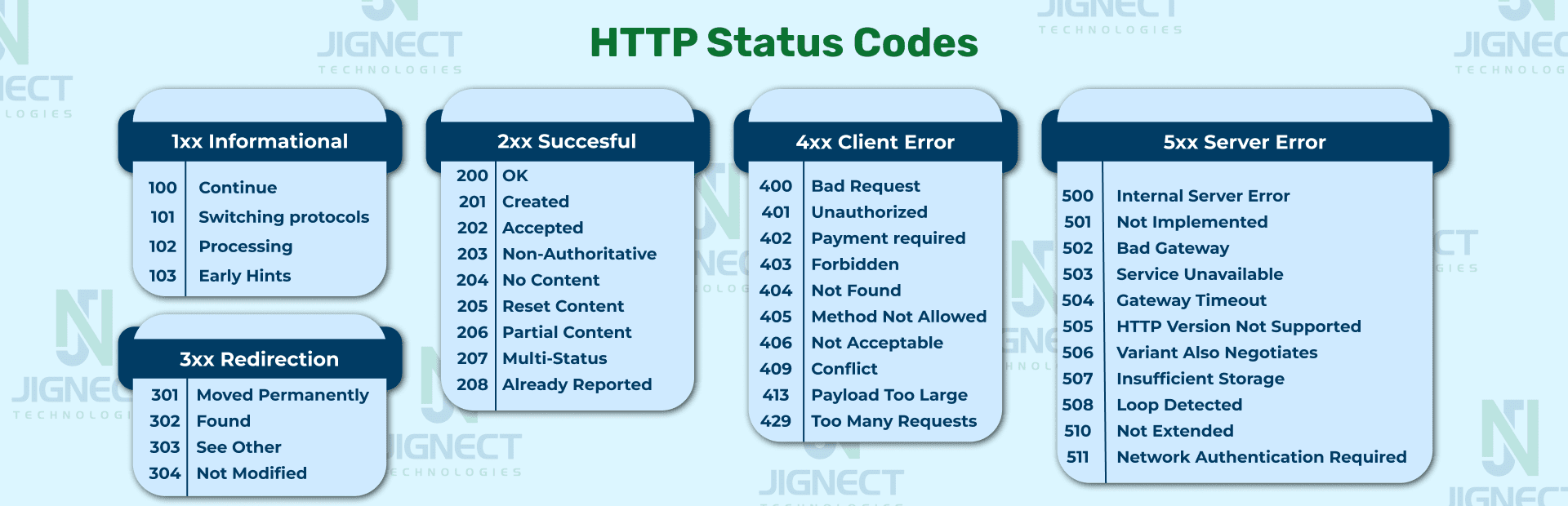
HTTP status codes are 3-digit numbers returned by the server to indicate the result of an HTTP request.
They help the client understand whether the request was successful, failed, or needs further action.
Status Code Categories
1xx → Informational
2xx → Success
3xx → Redirection
4xx → Client Errors
5xx → Server Errors
1. Cookies
Definition
Small pieces of data stored in the browser and automatically sent to the server with every HTTP request.
Storage Size
~4KB
Expiry
Can have expiry date or be session-based.
Sent to Server?
Yes (automatically with every request).
Example
Use Cases
-
Authentication (session ID)
-
Tracking
-
User preferences
2. localStorage
Definition
Stores data in the browser with no expiration time.
Storage Size
~5MB
Expiry
Persists until manually cleared.
Sent to Server?
No
Example
Use Cases
-
Saving theme preferences
-
Storing user settings
-
Caching data
3. sessionStorage
Definition
Stores data for one browser tab session.
Storage Size
~5MB
Expiry
Cleared when tab is closed.
Sent to Server?
No
Example
Use Cases
-
Temporary form data
-
Tab-specific session data
A storage event is fired when changes are made to localStorage or sessionStorage in one browser tab, and other tabs of the same origin are notified.
It allows synchronization of storage data across multiple tabs.
Important Behavior
-
Triggered only in other tabs/windows
-
Not triggered in the same tab where the change happens
-
Works for localStorage
-
sessionStorage works only within same tab session
Syntax
Example
Tab 1:
Tab 2:
When Tab 1 updates localStorage, Tab 2 logs the changes.
Storage Event Properties
-
event.key → The key that changed
-
event.oldValue → Previous value
-
event.newValue → New value
-
event.url → Page URL where change happened
-
event.storageArea → localStorage or sessionStorage
IndexedDB is a low-level, client-side NoSQL database built into browsers.
It allows storing large amounts of structured data, including files and blobs, inside the user's browser.
Why IndexedDB Is Needed
-
localStorage is limited (~5MB)
-
localStorage stores only strings
-
Need offline support
-
Need structured data storage
-
Need large storage capacity
IndexedDB solves these problems.
Key Features
-
Stores large amounts of data
-
Supports objects, arrays, files, blobs
-
Asynchronous API
-
Transaction-based
-
Uses indexes for fast search
-
Works offline
Basic Concepts
-
Database → Top-level container
-
Object Store → Similar to table
-
Transaction → Used to read/write data
-
Index → Used for searching
The postMessage API is used for safe cross-origin communication between different browsing contexts.
It allows communication between:
-
Window ↔ Window (popup or iframe)
-
Parent ↔ iframe
-
Web Workers ↔ Main thread
Why It Is Needed
Due to Same-Origin Policy:
-
Different origins cannot directly access each other's data
-
postMessage allows secure communication across origins
Basic Syntax
Sending Message
message→ Data to send-
targetOrigin→ Allowed origin for security
Receiving Message
Event Object Properties
Inside message event:
-
event.data → Message data
-
event.origin → Sender’s origin
-
event.source → Reference to sender window
A Service Worker is a background script that runs separately from the web page and intercepts network requests, enabling features like offline support, caching, and push notifications.
It is a key technology behind Progressive Web Apps (PWAs).
Why Service Workers Are Needed
-
Offline functionality
-
Network request caching
-
Background sync
-
Push notifications
-
Better performance
Key Characteristics
-
Runs in background (separate thread)
-
No direct DOM access
-
Event-driven
-
Works over HTTPS only
-
Acts as a proxy between browser and network
How It Works
-
Register Service Worker
-
Install phase (cache files)
-
Activate phase
-
Intercept fetch requests
Node.js is a runtime environment that allows JavaScript to run outside the browser.
It is built on Chrome’s V8 JavaScript engine and is used to build server-side applications.
Why Node.js Is Needed
Before Node.js:
-
JavaScript was only used in browsers
-
Backend was built using Java, PHP, Python, etc.
Node.js allows:
-
JavaScript on the server
-
Full-stack JavaScript development
Key Features
-
Asynchronous and non-blocking I/O
-
Event-driven architecture
-
Single-threaded with event loop
-
Fast execution (V8 engine)
-
Cross-platform
-
Large ecosystem (npm)
Node.js uses a single-threaded, event-driven, non-blocking architecture to handle multiple requests efficiently.
It is built on:
-
V8 Engine (Executes JavaScript)
-
libuv (Handles async I/O operations)
-
Event Loop (Manages execution flow)
1. V8 Engine
-
Compiles JavaScript into machine code
-
Executes JS very fast
-
Same engine used in Chrome
Node.js uses V8 to run JS outside the browser.
2. Single-Threaded Model
Node.js runs on a single main thread.
But it can handle thousands of requests using:
-
Event Loop
-
Non-blocking I/O
It does NOT create a new thread per request like traditional servers.
3. Event Loop (Heart of Node.js)
The event loop continuously checks:
-
Call Stack
-
Callback Queue
-
Microtask Queue
Flow:
-
Execute synchronous code
-
Offload async tasks to libuv
-
When completed → callback added to queue
-
Event loop pushes callback to call stack
4. libuv (Async Engine)
libuv handles:
-
File system operations
-
Network requests
-
Timers
-
DNS lookup
-
Thread pool
It uses:
-
OS kernel for async operations
-
Thread pool (default 4 threads) for blocking tasks
TypeScript is a superset of JavaScript that adds static typing and additional features to JavaScript.
It was developed by Microsoft.
TypeScript code is compiled (transpiled) into plain JavaScript.
Why TypeScript Is Needed
JavaScript is:
-
Dynamically typed
-
Prone to runtime errors
-
Harder to maintain in large applications
TypeScript solves this by:
-
Adding static types
-
Catching errors at compile time
-
Improving code readability
-
Enhancing developer experience
Basic Example
JavaScript:
TypeScript:
Key Features
-
Static typing
-
Interfaces
-
Type aliases
-
Enums
-
Generics
-
Access modifiers (public, private, protected)
-
Better IDE support (autocomplete, IntelliSense)
How It Works
-
Write
.tsfile -
Compile using TypeScript compiler (tsc)
-
Generates JavaScript file
-
Run JavaScript in browser or Node.js
TypeScript vs JavaScript
-
TypeScript → Statically typed (optional typing)
-
JavaScript → Dynamically typed
-
TypeScript → Compile-time error detection
-
JavaScript → Runtime error detection
1. Static Type Checking
-
Detects errors at compile time
-
Reduces runtime bugs
-
Improves code reliability
Example:
2. Better Code Maintainability
-
Clear type definitions
-
Easier to understand large codebases
-
Safer refactoring
3. Improved Developer Experience
-
Better IntelliSense
-
Autocomplete
-
Real-time error detection
-
Better debugging
Works very well in VS Code.
4. Enhanced Object-Oriented Features
-
Interfaces
-
Generics
-
Access modifiers (private, protected, public)
-
Abstract classes